The new Microsoft logo reminds us it is a window and not a flag. Its bold, flat colours and clean, confident look enjoys a tilted window designed to welcome us in.
When Sir Jonathan Ive said of his competitors that they have “the wrong design goals,” I think he was thinking of Microsoft’s Metro, the new Windows 8 user interface, as well as the Android crowd.
Isn’t Windows mostly about content creation? Users write documents, enter data, and so on; you need an efficient, full-size keyboard and a decent size screen. Isn’t a Smartphone or a tablet mostly about content consumption? Users passively watch movies, read the news, listen to music or consult stock levels on the move; that means a finger will do. Data entry is kept to a strict minimum.
What Microsoft is attempting to do is to straddle both worlds with one operating system; the same one for desktop and mobile. I am not yet convinced they will succeed. Even Apple didn’t try to combine iOS with MacOSX (yet), though that has crossed their mind. The design goals for desktop and mobile are very different.
The main question though is: “Is Metro genuinely better than its parents or peers?”
I for one, don’t think it is. It strikes me as being an operating system with an identity crisis tending towards “a lowest common denominator.” Like Intel, Microsoft missed the bend in the road that led us all to touch-screen mobile devices and finds itself in a frantic game of catch-up. It is perhaps trying too hard.

Windows 7 Internet Explorer icon (left) and the redesigned Metro version.
According to Microsoft, Metro has been “reimagined from the chipset to the user experience” to get closer to the user via the touch-screen. But in the race to outbid Apple’s minimalist values, it seems to have gone way too far and compromised its rich application legacy. Metro regresses all the way back to Windows 3—released in 1990—when computer graphics were out of necessity crude, chunky, and simple. Back then graphics cards could only handle 16 colors. Sophisticated effects such as opacity and shadowing were out of the question.
You have to feel a bit sorry for Microsoft’s graphic artists. It seems like they got caught up in this Apple minimalist vortex and were told to abandon their natural instincts to create an attractive and efficient user interface.
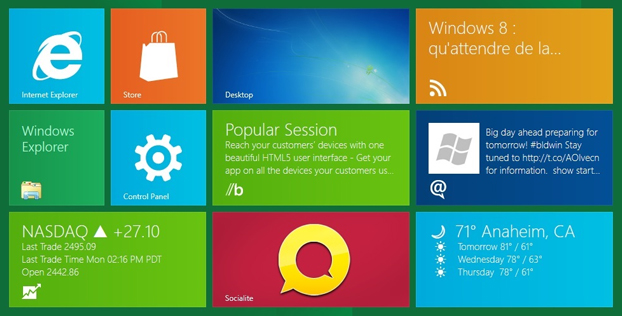
Metro Windows 8 Start screen looks great on a tablet, not quite so great on a desktop.
Here’s the problem: Metro seems regressive, stark, and clumsy. It purposely avoids nearly everything that makes a user interface look attractive. They haven’t gone all the way back to DOS, but they came damn close. Metro basically avoids gradients (light to dark shading), opacity, dimensional effects, shadows, subtle colors, buttons, ribbons, highlights, reflections, serif typefaces, and so on. Metro is visually crude.
Why Metro Matters to Businesses
The problems of Metro go beyond its uninspiring subway station signage though; it might actually prove expensive for businesses.
I can’t help thinking about the thousands of software developers out there that invested in Microsoft’s traditional user interface APIs. Usually, when Microsoft introduces a major release of Windows, its user interface is widely copied by third-party software developers to keep things coherent for users. So, if Metro catches on, many companies will be forced to rewrite their software, which in turn might provoke a reassessment of what’s available for Metro in the market. This is a huge investment and risk for software developers. They have no choice; either they follow suit and stay ‘cool’ or they could be condemned to the scrap heap.
Beyond its Bauhaus appearance, Metro is also difficult to use. For example, overlapping or cascading windows have been eliminated: Microsoft’s apps such as mail, photos, and SkyDrive are strictly full-screen (though a split screen is permitted); fine for a Smartphone, but for a desktop? They have also pretty much abandoned the ‘Esc’ key and other traditional keyboard shortcuts. Even mouse capabilities are abridged. For example, right-clicking does nothing in many contexts. This is because there is no analogy for right-clicking in the touch-screen world for which Metro is optimized. Desktop users will find it considerably more difficult to do their jobs within Metro. Think of the retraining, think of the drop in productivity. Enterprises won’t move for years.
Why did Microsoft Regress?
The reason for Metro’s wide-scale simplifications is that this interface was designed for portable devices. So for the sake of cross-device consistency, Metro sacrifices much of what makes desktop computers powerful and easy to use. What works on a Smartphone doesn’t look so great on a 27 inch computer monitor.
True, Metro permits you to use a limited subset of keyboard and mouse techniques, but they are not encouraged. Microsoft spent the last 20 years training you to become a fairly skilled artist, and is now telling you to abandon your palette and brushes and use your fingers. Some say it’s a bold strategy, others say it’s reckless.
The bottom line
It’s likely that few companies developing business software will decide to redesign their interfaces to look and feel like Metro. Why? First, it’s a radical change and therefore lots of work to adapt. Second, many users are likely to revolt and resist upgrading. They will need significant retraining.
That’s why Microsoft is hedging their bets on Metro, allowing you to switch to traditional Windows “desktop” mode whenever you want. But it is incomplete. They eliminate the Start button, and some features are only available from the desktop, others only from Metro. It seems very clumsy.
There’s no disguising that Metro is a tablet interface forced into a desktop computer. And it’s an uncomfortable marriage. Apple’s Tim Cook is right when he says about Metro: “You can converge a toaster and a refrigerator, but those aren’t going to be pleasing to the user.”
He would say that wouldn’t he? I believe he is right.
 The Fourth Column
Leave a comment